Skincare Routine
- 4.7
- Rating
- 10.00K
- Installs
- $3.99
- Price

 Analysis by App-foxy
I approached Skincare Routine as a practical beauty app rather than a source of expert treatment advice. Its purpose is simple: help me remember the steps in my daily skin-care regimen and keep an eye on how my skin changes over time. That narrow focus is also its main appeal. Instead of trying to replace a dermatologist, product database, or elaborate beauty community, it gives a routine a place to live on my phone.
The app is made by Mento Apps Ltd and sits in the beauty category. It has a 4.7 average from around 700 ratings, with more than 100 written reviews, and has passed the 10K-install mark. Those figures suggest a small but clearly engaged audience. I also like that it is rated for Everyone, making the presentation approachable for a broad range of users. The current version is 7.4.77, and the app is available for $3.99.
What using Skincare Routine feels like day to day
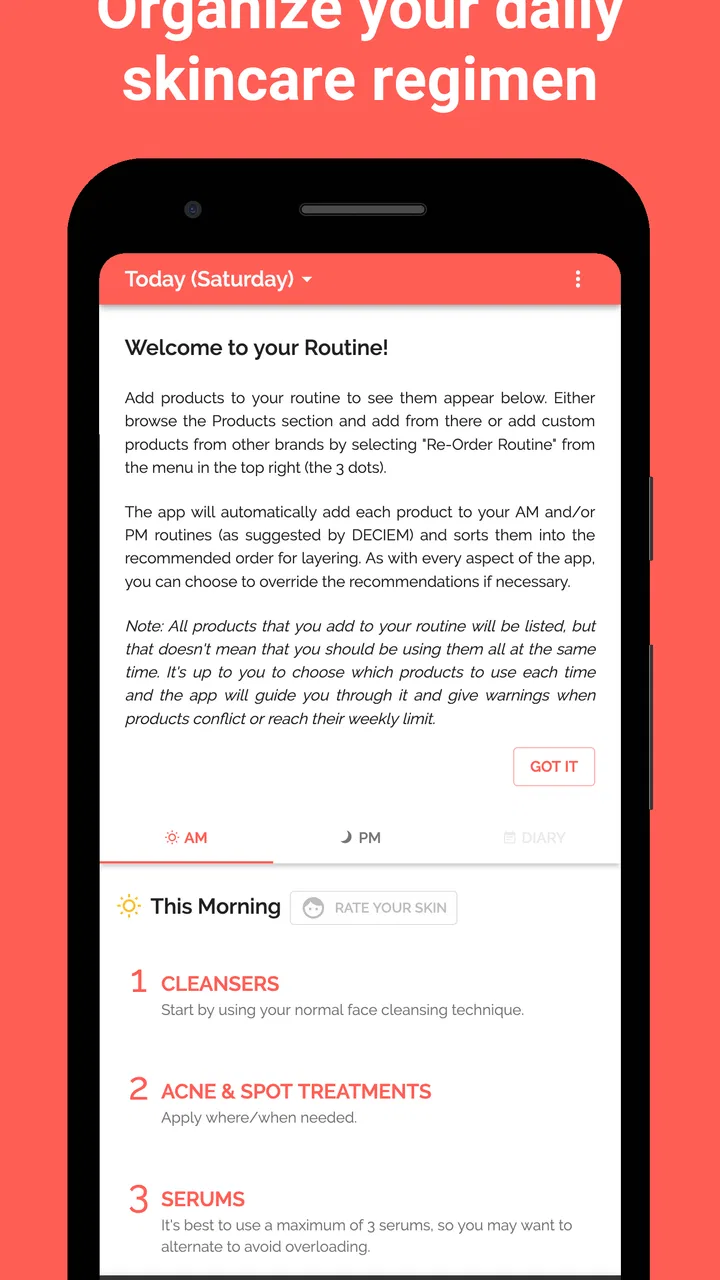
The first useful question is not whether the app has an impressive list of tools, but whether it reduces the small amount of thinking that makes skin care easy to abandon. In my experience, a routine tracker earns its place when I can open it quickly, see what belongs in the morning or evening, and mark progress without turning the process into another chore.
You May Also Like

 Pandora - Music & Podcasts
Pandora’s Music Is Easy to Start, but Harder to Recover
Pandora’s strength is its low-effort path from a seed to a station. Its weak spot is how much confidence it asks you to place in connection, setup, and quiet recovery.

 8 Ball Pool
 Is Built on Rivalries, Rematches, and Routine
A close look at the rivalries, rematches, shared routines, and unanswered safety questions that turn a quick pool match into a persistent mobile community.

 Samsung Music
’s Quiet Strength Is Playing What You Already Own
Its reach comes less from spectacle than from dependable access to a personal library. That simplicity is both the app’s strongest retention engine and its ceiling.

 AccuWeather: Weather Radar
AccuWeather Review: A Quick, Clear Forecast for Everyday Decisions
For everyday plans, the best forecast is the one you can understand quickly. AccuWeather makes rain timing, radar, and local conditions easy to act on, with a few trade-offs.

 Hill Climb Racing
Why Hill Climb Racing Still Turns Crashes Into One More Run
A tiny car, a bumpy hill and one more upgrade: Hill Climb Racing keeps resurfacing because its simple chaos makes every near-miss feel personal.

 AliExpress - Shopping App
AliExpress Makes Global Shopping Feel Personal, but Shoppers Bear the Risk
AliExpress turns a global marketplace into a pocket-sized discovery engine. Its reach is useful, its shopping loop compelling, and its trade-offs easy to miss.
More From Our News Desk
View All News


That is where this app makes sense. I can treat it as a personal checklist for recurring care: cleanser, treatment, moisturizer, sunscreen, or any other steps I have decided to follow. The value is not in telling me that every person needs the same products. It is in helping me follow my own plan consistently enough to notice whether the plan is working for me.
The best way to use this app is as a consistency tool, not as a diagnosis tool. If I am trying to understand persistent irritation, sudden breakouts, or a reaction to a product, a tracker can help me remember what I used, but it cannot explain the medical cause. That distinction matters, especially for anyone tempted to treat a beauty routine as a substitute for professional advice.
Getting a routine under control
A common problem with skin care is not a lack of products; it is a lack of structure. I may remember the cleanser but forget the treatment, use a product irregularly, or change several things at once and then have no idea what helped. A routine-focused app gives each step a repeatable place in the day, which makes the habit easier to inspect.
I found the progress angle more useful when I kept the routine deliberately small. Starting with every product in the bathroom can make the tracker feel like administration. A better approach is to enter the steps I genuinely intend to repeat, use the app until they become automatic, and only then add optional treatments. This keeps the record meaningful rather than turning it into a long list of good intentions.
There is also a subtle benefit to recording progress over time: it can slow down impulsive product switching. Skin rarely gives an immediate, perfectly clear verdict after one use. A visible routine history encourages me to ask whether I have followed a plan consistently before replacing it. That is a more sensible workflow than buying another product every time the mirror looks disappointing.
Speed expectations and the moments that feel heavier
For this type of app, perceived speed is mostly about reducing friction. I do not need a complicated visual experience while standing at the sink. I want the routine to open without making me navigate through unnecessary screens, and I want a completed step to feel quick to record. The app’s focused purpose works in its favor because it is not trying to be a social feed, shopping platform, or image editor at the same time.
The heavier moments are likely to come from the routine itself rather than from the basic act of checking it. If I create a detailed regimen with many products, repeated reminders, and frequent progress updates, the app becomes more demanding to maintain. That is not necessarily a flaw, but it creates a trade-off: more detail can make the record more useful, while too much detail can make me stop using it.
My practical advice is to separate essential steps from experiments. The essential group should be the routine I can follow even on a rushed morning. Experimental products or occasional treatments should not be allowed to clutter that core view. This makes the app feel faster because I am not mentally sorting through every possibility before I can begin.
A realistic example is a weekday morning when I am late. I might open the tracker, confirm the few steps I actually use before leaving, and move on. In the evening, when I have more time, I can review whether I completed the full routine and note a change worth watching. That two-level approach is more sustainable than demanding a detailed journal entry every time.
Heavy-use moments and progress tracking
The app becomes more valuable during periods when I am actively changing my routine. If I introduce a new serum, adjust how often I use an exfoliating product, or try to become more disciplined with sunscreen, a record helps me distinguish a real pattern from a vague impression. I would not treat the record as scientific proof, but it can improve my memory and make conversations with a skin-care professional more precise.
One non-obvious tip is to change only one meaningful part of the routine at a time whenever possible. If I add three products together, the tracker may show excellent consistency but still leave me unable to identify which product caused improvement or irritation. The app cannot solve that experiment-design problem for me, but its routine structure makes the mistake easier to avoid if I use it thoughtfully.
Another useful workflow is to review progress at a fixed interval instead of checking the mirror repeatedly. Constant checking can make small daily fluctuations feel more important than they are. A calmer review habit gives the history more context and reduces the temptation to react to every imperfect day.
There is a trade-off here. A tracker can encourage patience, but it can also make some users overly focused on their appearance. If recording skin changes starts to increase anxiety, the right response is to simplify or pause the tracking habit. No beauty app should become a source of pressure.
Reliability in an everyday routine
Reliability has a different meaning here than it does for a navigation or banking app. I am mainly judging whether the routine remains understandable and usable over repeated days. The app’s long presence, with a release date of August 13, 2018, and its current version indicate that it has continued to be maintained as a product rather than appearing briefly and disappearing.
That history is reassuring, but it does not remove the need for sensible expectations. A routine tracker is only reliable if I keep my entries accurate. Marking a step complete automatically when I skipped it may make the record look neat, but it destroys the very progress history I wanted. The app can organize my behavior; it cannot make the record honest for me.
I also prefer to treat the progress record as a personal aid rather than an archival medical file. If a skin issue becomes serious, I would take relevant information to a qualified professional instead of assuming that an app history contains everything needed for an assessment. Used that way, the tracker supports better recall without pretending to offer clinical certainty.
For people who share a bathroom or have a busy household, reliability also depends on whether the routine is easy to resume after interruptions. I may miss an evening because of travel, illness, or a late night. A good habit system should help me restart the next day instead of making one missed entry feel like failure. The most useful mindset is to look for a repeatable pattern, not a perfect streak.
Device constraints and the cost of simplicity
Skincare Routine requires Android 8.0 or later, so anyone using an older phone will need to check compatibility before paying. On supported devices, its focused nature should make it a reasonable fit for people who do not want a large, resource-heavy beauty platform. The app is not the kind of tool I would choose for entertainment or browsing; its job is to stay out of the way while I complete a habit.
The $3.99 price changes how I judge it. A paid app can be worthwhile when it replaces a notebook, reduces forgotten steps, and helps me avoid careless product experimentation. However, users who only need a basic reminder may find that a general calendar, notes app, or built-in task list is enough. Those alternatives are less specialized, but they may already be available on the device and require no separate purchase.
This is an important limitation rather than a reason to dismiss the app. Specialization has value only when I will actually use the specialized structure. If my routine has two stable steps and I never review progress, a general reminder probably offers better value. If I am building a multi-step regimen and want the subject matter kept separate from work and household tasks, a dedicated beauty tracker becomes easier to justify.
I would also avoid expecting the app to replace product knowledge. It can help me organize what I use, but I still need to read labels, understand how products are intended to be used, and pay attention to how my skin responds. The app’s Everyone age rating makes it broadly accessible, yet accessibility should not be confused with personalized medical guidance.
Who will get the most from it
I think this app suits beginners who have purchased several skin-care products but have not formed a dependable order or schedule. It also fits people who are returning to a routine after letting it slide. The simple act of seeing the planned steps can remove the “what was I supposed to do tonight?” hesitation that often leads to skipping everything.
It can be especially useful for someone testing patience. If I tend to abandon a product after a few days, a progress record gives me a clearer view of how regularly I used it. That does not prove that the product is effective, but it tells me whether I actually gave my routine a fair trial.
People who should skip it are those looking for ingredient scanning, shopping recommendations, dermatologist consultations, or a large social community. This is not where I would go for product discovery or diagnosis. I would also skip it if I dislike entering routines manually or know that tracking my appearance makes me obsessive. A tool that creates stress is not helping, regardless of how well organized it is.
How it compares with ordinary alternatives
A paper notebook offers flexibility and can capture detailed observations, but it is less convenient at the bathroom counter and easier to forget. A notes app is faster for free-form comments, yet it does not naturally separate a recurring regimen from unrelated reminders. A calendar can handle repetition, but skin-care progress often benefits from a dedicated context rather than a series of generic appointments.
Compared with broad wellness apps, this one is more focused. That focus means fewer distractions, but it also means I should not expect exercise logs, nutrition analysis, or a complete health dashboard. Compared with a product-review community, it is more personal and less influenced by other people’s routines. That is a strength when I want to observe my own habits, and a weakness when I want recommendations from a wider group.
The deciding question is therefore not whether it has more features than every alternative. It is whether a dedicated place for skin care will make me more consistent than the tools I already have. For me, the answer is yes when the routine is changing or complicated, and probably no when I only need one occasional reminder.
My performance verdict
Skincare Routine is a focused beauty app that earns its place through organization rather than spectacle. I like it most as a quiet daily companion: something I can consult quickly, use to keep a routine from drifting, and revisit when I want a more reliable memory of what I have been doing. Its strongest performance is behavioral, because it turns an easily forgotten plan into a visible sequence.
Its limitations are equally clear. It cannot determine what my skin needs, explain every reaction, or guarantee that a routine will produce the result I want. The more complicated I make my regimen, the more effort the tracker demands from me. And at $3.99, it needs to provide more personal value than a free notes or reminder tool before it feels like a sensible purchase.
Overall, I would recommend it to someone who wants a dedicated skin-care routine tracker and is willing to use it consistently. I would not recommend paying for it merely because the idea sounds organized. Start with a small routine, record it honestly, review changes calmly, and keep professional advice in the picture when skin problems go beyond ordinary cosmetic concerns. Used with those expectations, Skincare Routine is a practical, approachable way to make daily care more deliberate.
FAQs for Skincare Routine
01What is Skincare Routine, and what can I use it for?
Skincare Routine is an app designed to help users organize and follow their daily skin-care habits. It can be used to create morning and evening routines, schedule product applications, record progress, and receive reminders. The app may be useful for beginners who need structure as well as experienced users who want to keep track of several products and treatment steps.
02Can Skincare Routine recommend products for my skin type?
The app may offer guidance based on information such as your skin type, concerns, and routine goals, but its suggestions should be treated as general information rather than professional medical advice. Skin can react differently to the same ingredient, so you should review product labels carefully and introduce new products gradually. Consult a dermatologist if you have persistent, painful, or severe skin problems.
03Does Skincare Routine work for different skin types and concerns?
Skincare Routine can generally be adapted to common needs such as dry, oily, combination, sensitive, or acne-prone skin. You can usually adjust routine steps and track products according to your personal goals. However, the app cannot diagnose a condition or guarantee results. Users with allergies, eczema, rosacea, or other diagnosed concerns should follow advice from a qualified healthcare professional.
04Does Skincare Routine require an internet connection or account?
Some features may work offline after the app has been installed, including viewing saved routine steps or checking reminders. An internet connection may still be required for account synchronization, backups, updates, educational content, product databases, or optional community features. Requirements can vary between the Android and iOS versions, so check the app-store listing and privacy information before creating an account.
05Is Skincare Routine free to download, and are there in-app purchases?
Skincare Routine may be available as a free download, but certain features can be limited or offered through premium subscriptions or in-app purchases. Paid options may include advanced tracking, additional reminders, personalized plans, cloud synchronization, or removal of advertisements. Before confirming a purchase, review the pricing, renewal terms, and cancellation instructions shown in the Google Play Store or Apple App Store.
Pros
- Simple routine tracking helps users stay consistent with daily skincare.
- Product reminders can reduce the chance of forgetting treatments.
- Suitable for beginners who need guidance organizing skincare steps.
- Progress records make it easier to notice changes over time.
- Clean layout makes routine information quick to review.
Cons
- Some useful features may require a subscription or in-app purchase.
- Recommendations may not suit every skin type or medical condition.
- Results depend on consistent use and may take several weeks to appear.
- The app cannot replace advice from a qualified dermatologist.
- Frequent notifications may feel intrusive for users with simple routines.

Skincare Routine
Gallery